Every event that sells tickets through Sommly uses the same four-step checkout: pick the ticket types, add your details, pay through Mollie, and collect your PDF tickets from your inbox.
1. Choose your tickets
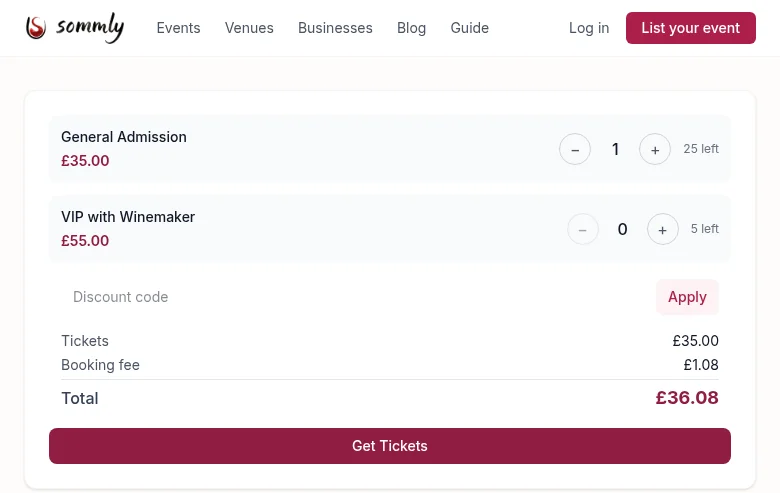
Scroll to the Tickets panel on the event page. Events can have more than one tier, for example General Admission and VIP, each with its own price and a count of how many are left.
Use the + and − buttons to set the quantity. Mix tiers freely. A running total appears below, including the small booking fee.
Tip
2. Your details
Tap Get Tickets. If you are not signed in, you will be asked for a name and email. Your tickets and the receipt go to that address, so double-check it.
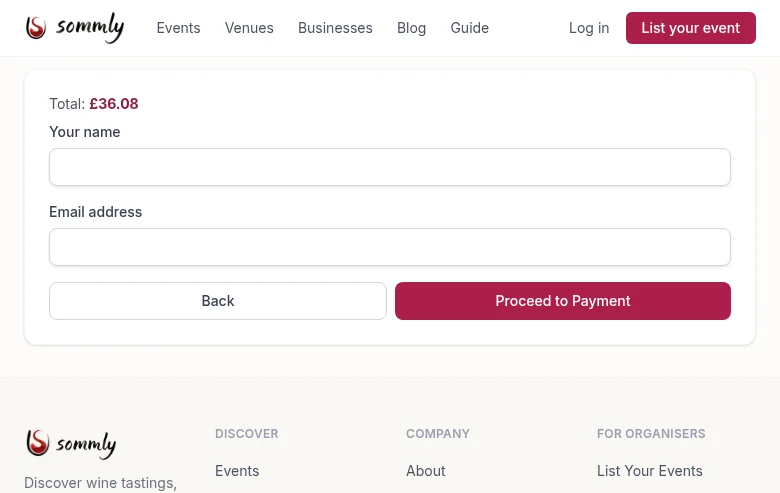
Signed in as a wine lover? Your name and email are filled in automatically and you jump straight to payment.
3. Pay through Mollie
Hit Proceed to Payment and Sommly hands you over to Mollie, our payment provider. You can pay by card, Apple Pay, Google Pay, or any other method the organiser has enabled.
Note
4. Confirmation
Once the payment clears you are redirected back to Sommly to a confirmation page with your order summary. Within a few seconds you will also get a confirmation email from [email protected] with your tickets attached as a PDF.
Each ticket has its own QR code. On the night, either print the PDF or show it on your phone. The door will scan it and wave you in.
Heads up
Redownloading your tickets
Lost the confirmation email? If you are signed in, go to My Orders, open the order, and click Download tickets. If you booked as a guest, paste the download link from your confirmation email into your browser and it will fetch the PDF for you.