Ticket types are the individual tiers a buyer picks between: General Admission, VIP, Early Bird, and so on. Each tier has its own name, price, and capacity.
Heads up
What a ticket type looks like to buyers
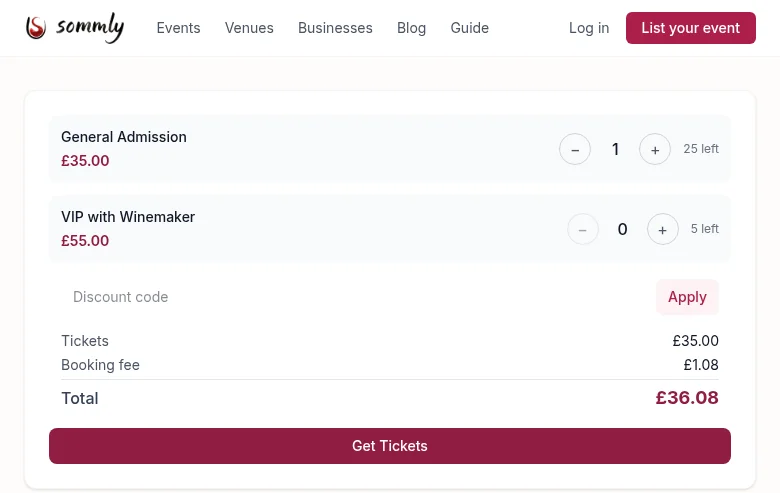
Once tiers are live on your event, buyers see the ticket picker at the bottom of the event page. They pick a quantity per tier, a live total appears (ticket price plus booking fee), and they check out through Mollie.
Pricing
Tickets are sold in GBP, prices are inclusive of everything except the booking fee. On top of your set price, the buyer pays:
- A 2.5% + 20p booking fee. Visible before checkout.
- Mollie's transaction fee, roughly 1%, deducted from your payout on the Mollie side.
For a £35 ticket:
- Buyer sees £35.00 + £1.08 booking fee = £36.08 total.
- You receive roughly £34.65 after Mollie's fee.
Capacity and sell-outs
Sommly tracks sales in real time against each tier's capacity. When a tier is sold out, it shows as Sold out on the public page and stops accepting orders. When every tier is sold out, the event switches to a full Sold out badge and hides the picker.
Discount codes
Sommly supports discount codes per-event. They are shown to buyers as a code field above the total on the event page. Like ticket types, discount codes are set up on the back end for now. Tell us the code string, the discount (percentage or fixed), and any usage cap or expiry, and we will apply it to your event.
Closing sales early
To stop sales before the door without deleting tiers, drop the event from Published back to Draft from your Events list. Existing orders are untouched; new ones stop coming in.